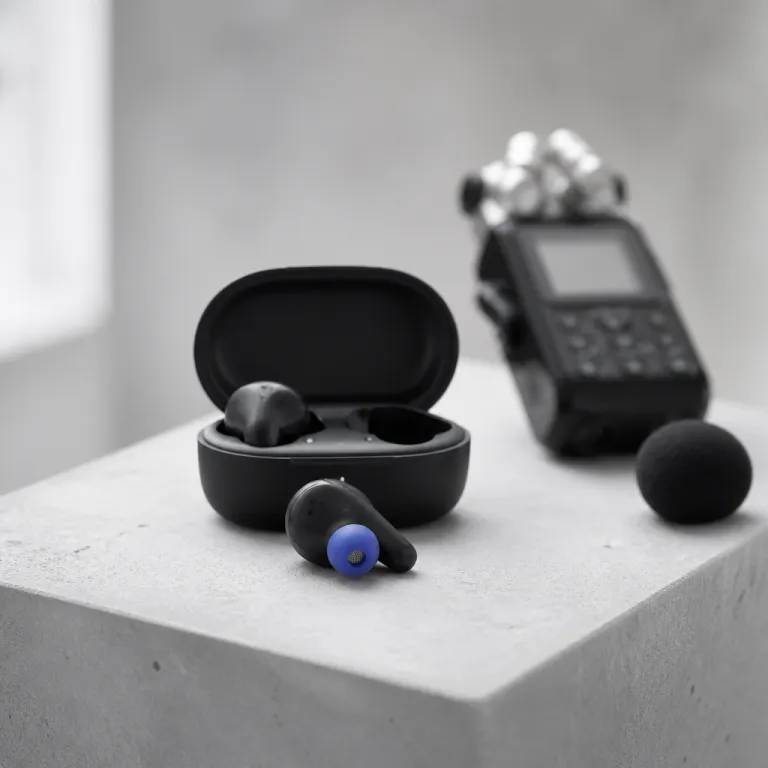
Why wireless earbuds struggle with video call microphones
Remote workers often assume any wireless earbuds will handle video calls well. In reality, the typical wireless earbuds video calls microphone setup is constrained by physics, industrial design, and aggressive cost cutting that favors speakers over mics. Those tiny buds sit far from your mouth, exposed to room noise and wind, which makes capturing a clean voice signal much harder than delivering good music playback.
Each earbud usually hides one or two miniature microphone capsules on the outer shell, and these mics fight constant noise from keyboards, HVAC systems, and traffic while trying to capture your voice. Because the ear and cheek block part of the sound path, the earbuds rely heavily on digital signal processing (DSP) to reconstruct your speech, which is why call quality can swing wildly between models that look almost identical. This is also why many Bluetooth earbuds that sound great for music suddenly fall apart on phone calls or Zoom meetings when the room gets loud.
Over-ear Bluetooth headphones have an advantage because their microphones often sit on longer arms or at least further from the ear, but many professionals still prefer true wireless buds for comfortable wear and portability. That trade-off means you must judge not only sound quality and active noise cancellation, but also how the buds handle your everyday calls in a real office or café. When you read full product descriptions on retail sites, you will notice pages of claims about noise cancelling and battery life, yet almost nothing measured about microphone performance under stress, such as signal-to-noise ratio (SNR) or mean opinion score (MOS) from standardized tests.
Beamforming, AI and active noise: what really shapes your voice
Most modern wireless earbuds use beamforming, which combines signals from multiple mics to focus on your voice and reject surrounding noise. In a two-mic system, one microphone points toward your mouth and another samples ambient noise, then the earbuds subtract the unwanted sound to improve call quality for the person on the other end. When this works well, you get surprisingly clear calls even when your office air conditioner or a nearby espresso machine is roaring.
Premium models such as AirPods Pro and some high-end Bluetooth headphones add more microphones and smarter algorithms to separate speech from chaos. AirPods Pro, for example, use a speech-detecting accelerometer that senses vibrations from your jaw and ear canal to help distinguish your voice from ambient noise, which lets the earbuds lock onto your speech while active noise processing handles the rest. This combination of hardware and software can make your voice sound more natural during phone calls, while still maintaining strong noise cancellation for your own listening comfort.
AI-based noise reduction is now marketed everywhere, but not every implementation treats your voice kindly, and some wireless earbuds aggressively crush background noise while also flattening your speech into a muffled, underwater tone. Before you buy on Amazon or any other marketplace, look for detailed tests that evaluate how the buds handle typing, dogs barking, and café chatter, not just pink noise in a lab. For a deeper technical perspective on how a single driver in-ear monitor can reshape expectations around noise canceling and microphone behavior, you can consult this in-depth analysis of advanced in-ear noise control, which includes measured isolation curves, example SNR and MOS figures, and recorded voice samples under different noise profiles so you can hear the trade-offs yourself.
Noise canceling versus microphone clarity on true wireless earbuds
Noise canceling and microphone clarity are related but not identical, and many wireless earbuds that excel at active noise for listening still struggle with transmitting your voice cleanly. Active noise cancellation uses outward-facing microphones and inverse sound waves to reduce what you hear, while the call microphone chain must preserve your voice for others, which is a different engineering problem. This is why some of the best earbuds for music, such as Sony WF 1000XM5, can still sound only average on Teams or Meet calls when reviewers measure speech intelligibility or MOS in noisy environments.
For remote work, you should treat the wireless earbuds video calls microphone as a separate purchase decision from music performance, even if both live in the same buds. Look for reviews that rate call quality independently, similar to how RTINGS publishes dedicated microphone scores and speech-in-noise tests alongside sound quality and noise cancelling depth, because this reveals whether the buds handle real office noise. When a model earns many five stars for bass and comfort but mixed comments about phone calls, that is a red flag for anyone who spends hours in virtual meetings.
Some in-ear designs, including compact planar IEMs, show how careful acoustic tuning can balance passive isolation with natural voice pickup, and you can see this trade-off explored in the Moondrop Meteor Kiwi technical deep dive. Those insights translate directly to true wireless earbuds, where the shape of the ear tip, the seal in the ear canal, and the venting for pressure relief all influence both noise cancellation and how your own voice sounds. A tight seal improves passive noise reduction and perceived sound quality, yet it can also make your voice boom inside your head, which some people find distracting during long calls.
Over ear versus earbuds for calls in real workspaces
When microphone performance is critical, over-ear headphones still hold a structural advantage over tiny earbuds. The larger ear cups allow more microphones, better wind shielding, and more powerful processors, which together can deliver clearer voice transmission in chaotic environments. Models like Bose QuietComfort Ultra or Sony WH 1000XM5 often beat true wireless buds in call quality tests, especially on trains or in open-plan offices where independent labs measure higher SNR and better background-noise suppression for speech.
However, many professionals prefer wireless earbuds because they feel lighter, look less intrusive on video, and slip easily into a pocket-sized charging case between meetings. True wireless designs also make it simple to keep one ear free for quick chats with colleagues, which is harder with bulky over-ear Bluetooth headphones. The trade-off is that the wireless earbuds video calls microphone has less physical space and power budget, so engineers must compromise between battery life, advanced noise features, and high-bitrate voice transmission.
If you work mainly from a quiet home office, the best earbuds can match or even surpass some mid-range over-ear models for clear calls, provided the buds fit your ear well and maintain a stable Bluetooth connection. For hybrid workers who jump between home, office, and cafés, a high-quality pair of Bluetooth earbuds with robust noise cancellation and strong beamforming microphones becomes essential. To understand how far over-ear technology can push noise reduction for focus work, you can examine this detailed test of advanced over-ear noise canceling headphones and compare its approach to what your earbuds attempt in a much smaller shell, paying attention to measured attenuation curves, example MOS scores, and recorded call samples that mirror real commuting and office scenarios.
How to judge real world mic quality before you buy
Retail pages on Amazon and other shops rarely tell you how a wireless earbuds video calls microphone behaves in a noisy coworking space, so you need your own checklist. Start by scanning independent tests that include recorded voice samples from Zoom, Teams, and phone calls, because written impressions alone often miss harshness or pumping artifacts. Pay attention to how the earbuds handle consonants like “s” and “t”, which reveal whether the processing is smearing your speech or introducing hiss.
Battery life and price still matter, but for remote workers they come after reliable call quality and stable Bluetooth performance, since a dead or glitchy pair during a client pitch costs more than any discount. Look for models that maintain at least five hours of talk time on a single charge, plus a charging case that extends total life to twenty hours or more, so you can survive a full day of meetings. Ratings with many four and five stars that specifically mention clear calls in noisy environments or reference measured mic scores are more valuable than generic praise about bass or comfort.
When you compare wireless earbuds, check whether the manufacturer supports modern Bluetooth codecs and multi-point connections, because these features reduce dropouts when you juggle a laptop and phone. True wireless buds that pair quickly and switch devices smoothly reduce friction in your workday, while also keeping your voice consistent across platforms. In the end, the best earbuds for professionals are not the ones with the flashiest noise cancelling claims, but the ones that make your voice sound like you are sitting in the same room as your client, even when lab-style speech-in-noise tests would show a challenging background.
Simple tests to run on your own wireless earbuds
Once you own a pair, you should test the wireless earbuds video calls microphone before any high-stakes meeting. Open your preferred conferencing app, start a solo call, and record a short monologue while you type, shuffle papers, and play café noise from a speaker to simulate real life. Then listen back on neutral headphones or speakers, focusing on whether your voice stays intelligible when the background gets busy and whether the level of your speech remains stable.
Repeat the test with one earbud removed, then with transparency mode on and off, because some buds change microphone routing in these states and can alter call quality. Try walking near a window or balcony to see how the earbuds handle wind, which is a classic failure point for many Bluetooth earbuds that place microphones directly on the outer shell. If your voice suddenly becomes thin or choppy whenever you move, the buds may be prioritizing connection stability over sound quality, which is a sign to consider a different model for professional use.
Finally, run a live test with a trusted colleague who can give blunt feedback about your voice, noise levels, and any artifacts like pumping or gating, and repeat this check every few months as firmware updates can change behavior. Treat this process like checking your camera framing or slide deck, because the microphone is part of your professional presence, not an afterthought. In hybrid work, the real measure of your gear is not the decibel rating on the box, but the silence on the tarmac when your client hears you clearly from a crowded gate and would rate the call as excellent on any MOS-style scale.
Key figures on wireless earbuds and call performance
- Hybrid work surveys from major collaboration platforms consistently rank background noise on calls as the top complaint among remote employees, ahead of video glitches or screen sharing issues, which underlines how critical microphone performance has become.
- Independent testing labs report that most true wireless earbuds achieve only mid-range scores for microphone quality, even when their active noise cancellation for listening ranks near the top of their class, showing a gap between marketing focus and real call needs.
- Consumer research indicates that a significant share of buyers still choose earbuds based primarily on battery life and music sound quality, despite spending several hours per day on video calls, which suggests many users underestimate the impact of mic design.
- Manufacturers have rapidly increased the number of microphones per earbud, with two-mic beamforming now standard and some premium models using four or more mics per side, yet real-world gains depend heavily on software tuning and not just hardware counts.
- Surveys of remote professionals show that a large portion have abandoned at least one pair of earbuds due to poor call quality, even when the buds were otherwise comfortable and well rated, highlighting how unforgiving clients can be when audio fails mid meeting.
FAQ about true wireless earbuds for video calls
Are wireless earbuds or over ear headphones better for video calls ?
Over-ear headphones usually provide better microphone performance because they have more space for multiple mics, wind protection, and stronger processors, which together improve voice pickup. However, high-quality true wireless earbuds can match them in quiet rooms and offer more comfortable wear for long days. Your choice should depend on how noisy your typical environment is and whether portability matters more than maximum call clarity.
How can I quickly test my earbud microphone before an important meeting ?
The fastest method is to open your conferencing app, start a private call, and record yourself speaking for one minute while typing and moving around the room. Listen back with good headphones to check whether your voice stays clear when background noise increases or when you turn your head. If you hear pumping, dropouts, or harsh sibilance, consider switching devices or adjusting fit before the real meeting.
Does better active noise cancellation always mean better call quality ?
Strong active noise cancellation improves what you hear, but it does not guarantee that your voice sounds better to others. Some earbuds prioritize suppressing external noise for the listener and apply aggressive processing that can distort speech on calls. Always look for separate evaluations of call quality rather than assuming that great noise cancelling automatically covers microphone performance.
What battery life should I expect for all day video calls with earbuds ?
For a full day of remote work, aim for earbuds that deliver at least five hours of continuous talk time on a single charge, plus a charging case that extends total battery life to twenty hours or more. This combination lets you move through back-to-back meetings with only short breaks for top ups. If your current pair dies before the afternoon, upgrading to a model with stronger battery life will improve reliability more than any minor sound quality tweak.
Are premium models like AirPods Pro worth the higher price for calls ?
Premium earbuds such as AirPods Pro, Bose QuietComfort Earbuds, or Sony WF 1000XM5 often justify their higher price with more consistent call quality, better beamforming, and more refined noise cancellation. They also tend to receive longer software support, which can improve performance over time through firmware updates and revised mic tuning. If your income depends on frequent client calls, the extra cost is usually easier to defend than risking a dropped or garbled conversation.