
Why microphone performance now defines the best headphones for Zoom calls
Remote teams judge your professionalism by your call quality before anything else. When people search for the best microphone headphones Zoom calls, they are really asking which headset makes their voice sound clear, natural, and free from background noise. A good pair of wireless headphones or a dedicated wireless headset must balance sound quality for you with excellent microphone pickup and noise suppression for everyone else.
Most modern bluetooth headphones advertise active noise canceling, but noise canceling for your ears is different from noise reduction for your voice. Noise cancellation or ANC inside the ear cups reduces external noise for listening, while the microphone array and digital signal processing handle noise cancellation for your outgoing audio. The best microphone headphones for Zoom calls combine strong ANC for your ears with smart noise reduction on the mic, so both sides of the conversation benefit from better audio quality and less fatigue.
Price still matters, yet call quality should sit above raw specifications like codec support or gaming headset features. A mid range bluetooth headset with a tuned boom mic can outperform expensive earbuds on Zoom if its call quality and noise cancellation are engineered for office work rather than music alone. When you compare models, ignore marketing stars and instead focus on rated hours of battery life, microphone placement, and how well the headset handles keyboard noise, room echo, and overlapping voices in real meetings.
Beamforming, AI mic arrays, and why Sony now leads noisy office calls
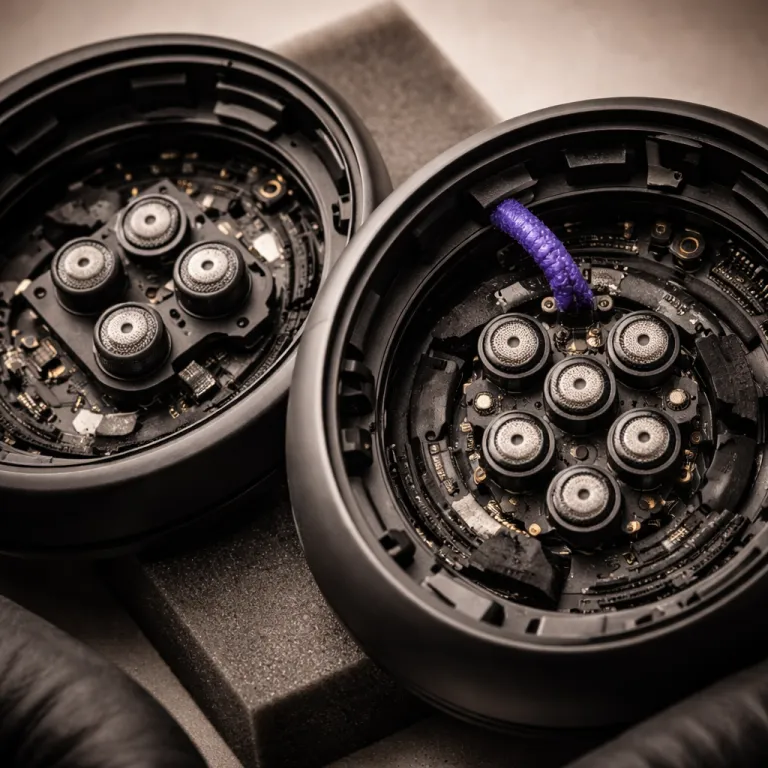
Beamforming microphones changed how headsets handle background noise by focusing on your mouth and rejecting the rest. In plain terms, a beamforming mic uses several tiny microphones in the ear headphones or ear headset to create a virtual “beam” that tracks your voice while applying noise reduction to sounds arriving from other directions. This technology made the best microphone headphones for Zoom calls far more usable in open plan offices, cafés, and shared home spaces.
The Sony WH-1000XM5 uses a four mic beamforming system for voice pickup, while the newer Sony WH-1000XM6 adds additional microphones and updated processing that Sony describes as AI-based noise reduction trained on sample voice data. That processing goes beyond classic fixed beamforming, because it analyses the pattern of your speech and separates it from keyboard clatter, HVAC hum, and other background noise that would otherwise hurt call quality. In office tests from reviewers who publish sample recordings on platforms such as YouTube, the XM6 keeps your voice clearer when several colleagues talk nearby, which makes it one of the best wireless headset options for demanding Zoom and Teams meetings.
Bose QuietComfort Ultra headphones still offer excellent ANC for listening, yet they consistently trail Sony on voice calling in noisy environments. Independent measurements and call demos from specialist audio reviewers show that their microphone system handles steady noise canceling well, but it struggles more with sudden sounds and sibilant voices, so your audio can sound slightly thinner to colleagues. If your work involves constant voice calling in busy spaces, the extra microphones and more advanced noise cancellation on the Sony WH-1000XM6 justify the higher price for many professionals who rely on Zoom all day.
Earbuds such as AirPods Pro 2 and similar bluetooth headset models remain convenient, but their smaller mic arrays and limited hours ANC performance usually cannot match over ear headsets for pure call quality. They work well for short calls and commuting, yet for four to eight hours of meetings, a full size headset with a life rated for long battery life and better sound quality is easier on both your ears and your colleagues. If you want to fine tune comfort and passive isolation, pairing the right ear tips with your noise canceling earbuds can significantly improve both audio and microphone consistency, and a detailed guide on choosing the right ear tips for your noise canceling earphones explains how to do this step by step.
| Model | Mic system | ANC type | Battery (ANC on) | USB dongle | Typical price tier |
|---|---|---|---|---|---|
| Sony WH-1000XM6 | Multi mic beamforming with AI processing | Hybrid over ear ANC | Up to ~30–32 hours | Not included by default | Premium |
| Sony WH-1000XM5 | Four mic beamforming array | Hybrid over ear ANC | Up to ~30 hours | Not included by default | Upper mid range |
| Bose QuietComfort Ultra | Multi mic system with noise rejection | Adaptive over ear ANC | Up to ~24 hours | Optional on some bundles | Premium |
| AirPods Pro 2 | Dual beamforming plus inward mics | In ear ANC | Up to ~6 hours (earbuds only) | No, case only | Upper mid range |
Failure modes: when good microphones sound bad on Zoom
Even the best microphone headphones for Zoom calls can fail when the environment or settings work against them. Loud mechanical keyboards, reflective rooms with bare walls, and fans placed near the microphone all create noise that confuses ANC algorithms and harms call quality. A bluetooth headset with strong noise cancellation may still transmit sharp keystrokes or breath noise if the mic sits too close to your mouth or if the gain is set too high.
Multi speaker meetings create another challenge, because your headset must decide which voice to prioritise when several people talk at once. AI assisted arrays such as those on the Sony WH-1000XM6 handle this better than older beamforming systems, yet they are not magic, and they still pass some background noise through when the room becomes chaotic. In those moments, a wired or wireless gaming headset with a directional boom mic placed two fingers from the corner of your mouth often keeps your voice more stable than tiny microphones hidden in earbuds.
Sibilant voices with strong “s” and “sh” sounds can also trip up cheaper microphones, making them sound harsh or fatiguing over long hours. If colleagues complain about sharpness, try moving the mic slightly off axis and lowering input gain before blaming the headphones or headsets themselves. For some remote workers, a mono ear headset can be a smart choice for focused listening and clear speech, and a dedicated article on why mono headphones are a smart choice for focused listening explores when that trade off beats full stereo ANC models.
Comfort, battery life, and certification for serious remote work
Comfort decides whether even the best microphone headphones for Zoom calls stay on your head for a full workday. Over ear headphones with deep ear cups and soft pads spread pressure more evenly, while lighter earbuds reduce heat but can irritate the ear canal over time. If you wear glasses, test how the clamping force of each headset interacts with the arms, because even small pressure points become distracting after several hours of voice calling and focused work.
Battery life is another non negotiable factor for remote professionals who jump between Zoom, Teams, and phone calls. Look for a life rated at least 30 rated hours with ANC on for over ear models, or a solid 6 to 8 hours ANC per charge for earbuds, so you are not forced into mid day charging breaks. Some wireless headset models include a usb dongle that improves connection stability and reduces latency compared with standard bluetooth, which can make your sound and mic feel more wired and reliable during critical presentations.
Teams and Zoom certification on products like Jabra Evolve or Yealink HA64 Pro mainly guarantees compatibility and predictable behaviour with mute buttons, call controls, and firmware updates. For prosumer buyers, certification is helpful but not essential, because many non certified headphones still deliver excellent audio and call quality when configured correctly. If you rely on your headset for client facing work, though, that certification can be a useful safety net, especially when your IT team manages devices across a large organisation.
How to test any headset and pick the right model for you
A realistic test will tell you more about the best microphone headphones for Zoom calls than any spec sheet or marketing copy. Start by recording yourself in a quiet room, then in a noisy kitchen with running water, and finally near a window with traffic noise, using the same wireless headset each time. Listen back on neutral headphones or speakers and judge not just clarity, but how natural your voice sounds and how much background noise remains.
Next, compare several headsets or earbuds by repeating the same script while typing, clicking a mouse, and shuffling papers. This exposes how well each microphone and ANC system handles transient sounds that typical noise cancellation algorithms often miss, which is crucial for open plan offices and shared home spaces. Pay attention to whether the bluetooth connection stays stable, whether the usb dongle improves range, and whether your colleagues rate one headset higher than others when they cannot see which model you are wearing.
If you care about refined listening between calls, an open back model such as the Sennheiser HD 599 can offer a more natural soundstage, and a detailed review for informed listeners seeking refined open sound explains when that trade off makes sense. For pure remote work, though, closed back noise cancelling headphones with strong ANC and reliable voice calling remain the safest choice. In the end, the best headset is not the one with the most stars on a product page, but the one that turns your daily background noise into silence for you and clear speech for everyone else. For most people in busy homes or offices, a modern over ear bluetooth headset with hybrid ANC, a multi mic beamforming array, and at least 30 hours of battery life will deliver the most consistently professional Zoom experience.
FAQ
How do I choose between earbuds and over ear headphones for Zoom calls ?
Over ear headphones usually provide better ANC, longer battery life, and more consistent microphone performance than earbuds. Earbuds are lighter and more discreet, but their smaller microphones and limited hours ANC often struggle with heavy background noise. If you spend several hours per day on Zoom, a comfortable over ear headset with strong noise cancellation is generally the safer investment.
Does Teams or Zoom certification really matter for home office users ?
Certification ensures that mute buttons, volume controls, and call handling work reliably with those platforms, and that firmware updates are tested for compatibility. For many home office users, non certified bluetooth headsets still perform very well once configured correctly. If your work is client facing or managed by an IT team, certification adds an extra layer of predictability and support.
What is the difference between ANC and noise reduction on the microphone ?
ANC, or active noise canceling, uses microphones and speakers in the ear cups to reduce external noise for your listening experience. Noise reduction on the microphone uses separate processing to filter out background noise from your outgoing voice signal. The best microphone headphones for Zoom calls combine strong ANC for your ears with effective microphone noise cancellation so both sides of the call benefit.
How long should battery life be for a work from home headset ?
For full time remote work, aim for at least 30 rated hours of battery life with ANC enabled on over ear models, so you can work several days without charging. Earbuds should offer at least 6 to 8 hours ANC on a single charge, with the case extending total life rated capacity across the week. Anything less risks mid day charging interruptions that can disrupt meetings and focus.
Can a gaming headset work well for professional Zoom meetings ?
A good gaming headset often includes a clear boom mic and strong sound quality, which can translate well to Zoom calls. However, some gaming headsets emphasise bass and positional audio over neutral tuning, which may not suit long voice calls. If you choose a gaming headset for work, prioritise models with balanced audio, comfortable pads, and reliable microphone noise reduction.